Elevate Your Workflow – Computer Mouse Devices

Productivity comes in many forms, whether it is the tools, the technology enabled communication, connected workflows, or even the mindset. The ENGworks Global office recently took a survey called “Elevate Your Workflow” with a theme that focused on computer mouse devices.
We participated in this survey because we were curious to know if there was an edge to using particular devices in BIM related roles. Whether it was the lights, the buttons, or cool racing stripes… we wanted to understand what moves the needle in productivity. Most importantly, we wanted to pass those insights on to you.
Read further to see our analysis, our survey results, and our top 10 recommendations to elevate your workflow.
Highlights from the Survey Responses
To start off, here is a visual that shows an overall ranking with the top three features across all mouse devices that appeared in the survey results.
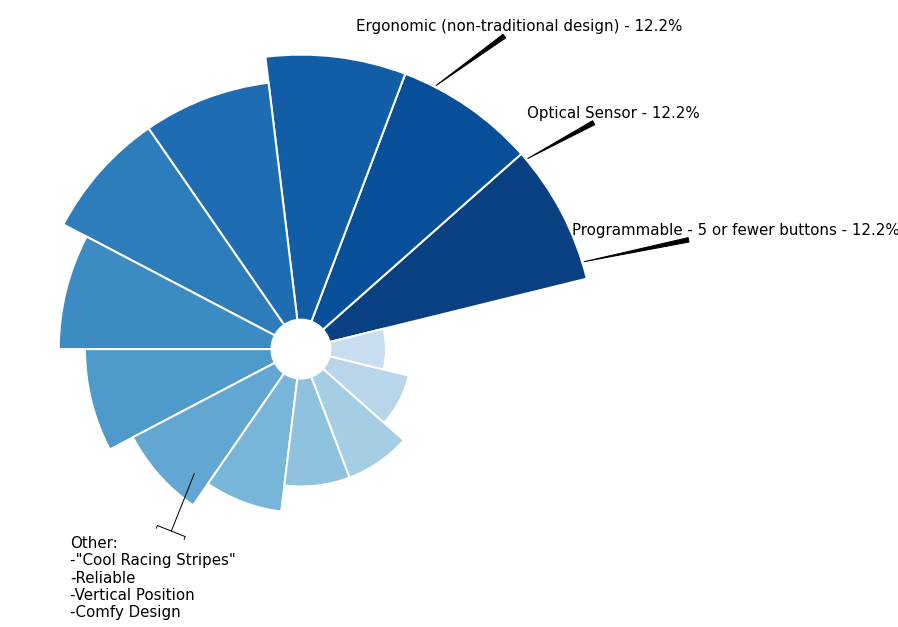
after market product upgrade (sticker added to mouse device for strategic effect).
Now, let’s get into an analysis of specific features.
Programmable Buttons & Wireless vs. Wired Debate
In my personal experience, I have found that equipment meant for gaming purposes can work well in CAD and BIM related roles. Gaming equipment has a lot more features, customizations, buttons, and the performance to handle long durations of use, which could be a very suitable solution in the AEC industry as well.
Programmable buttons on mouse devices are popular for gaming because of the built-in shortcuts and macros that can be context specific in different games. With the plethora of software available in the industry, I had wondered if that would translate as a use case for shortcut commands in Autodesk® Revit® or AutoCAD®, for example.
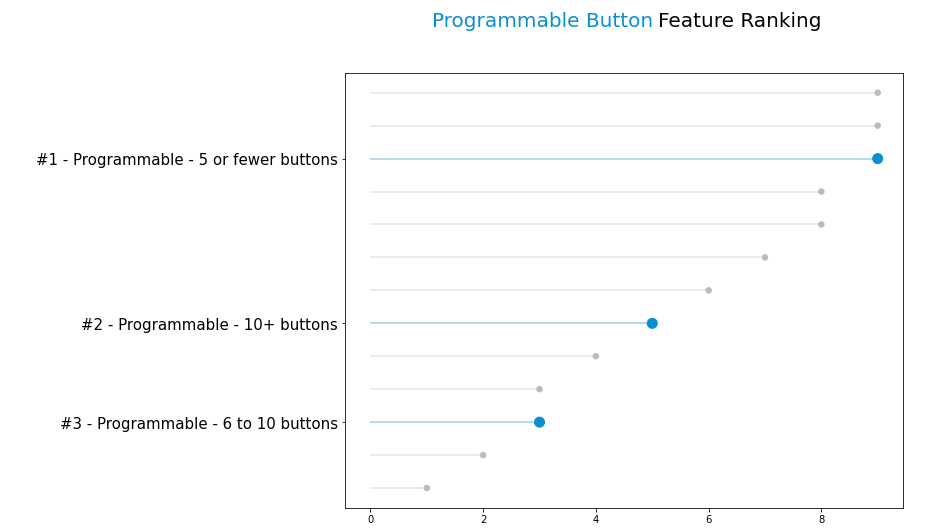
To my surprise, more programmable buttons didn’t always necessarily mean “better” or “more popular.” In fact, mouse devices with fewer than five buttons received almost double the amount of survey responses compared to those that exceeded 10 buttons. These mouse devices also tripled the amount of responses compared to those that had 6 to 10 buttons.
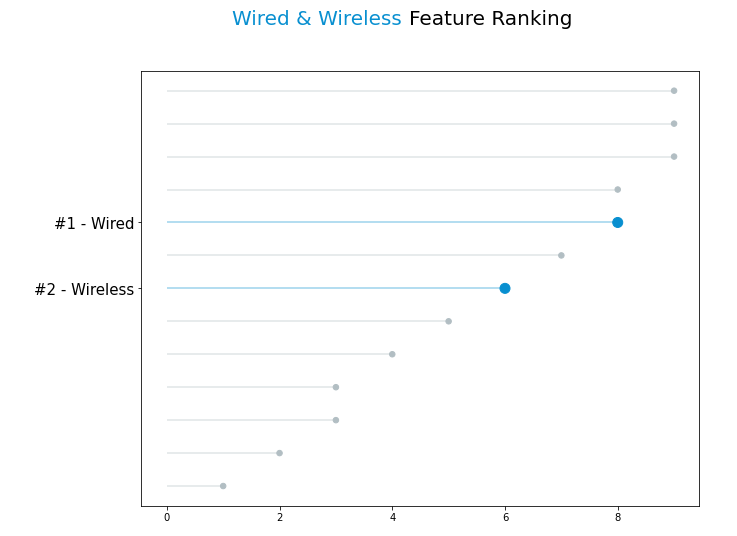
Additionally, the race was very very close between wired and wireless mouse devices. It just so happens in this office that wired beat out wireless mouse devices, according to the number of survey responses.
Full Feature Breakdown
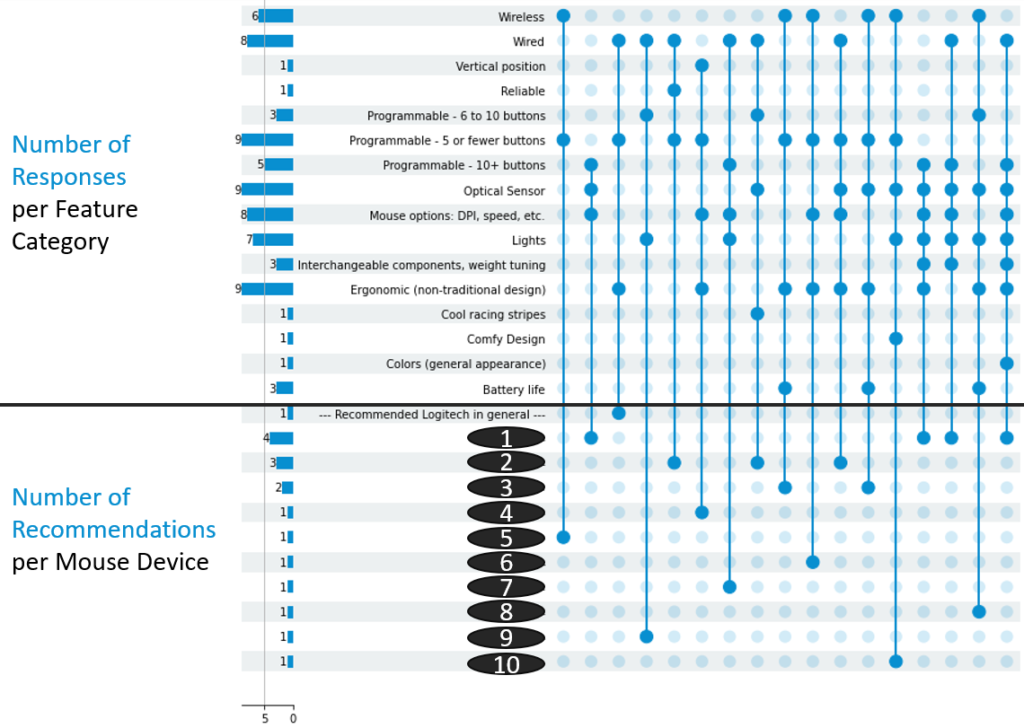
Here is a full breakdown of all features and all mouse devices that appeared in the survey results. Notice that several differently ‘called out’ features are noted by independent survey respondents and ultimately result in similar mouse recommendations.
Mouse Device Recommendations
Here are our mouse recommendations along with comments about each one.
- 1 – Logitech G502 HERO:
This mouse device is the most popular device in the office. It is noted that while it is Number One on the list, the 10+ button feature category responses are only attributed to this mouse device and no others. From my personal experience, I have programmed the lower rhombus shaped button as a trigger to make emails automatically read and archived to a certain folder. I have also configured the top scroll wheel to automatically set up an MS Teams invite by toggling it to a hard left. Finally, the lights are pretty cool. Here are additional comments about this mouse below.- “Many programmable buttons within easy reach of index finger/thumb.“
- “Ergonomic, suitable for palm and claw style grips.“
- “Unlike other mice with programmable buttons, this mouse uses the G-Shift button that gives double functionality to each programmable button.“
- “Increases speed“
- “Programmable buttons that are context specific.“
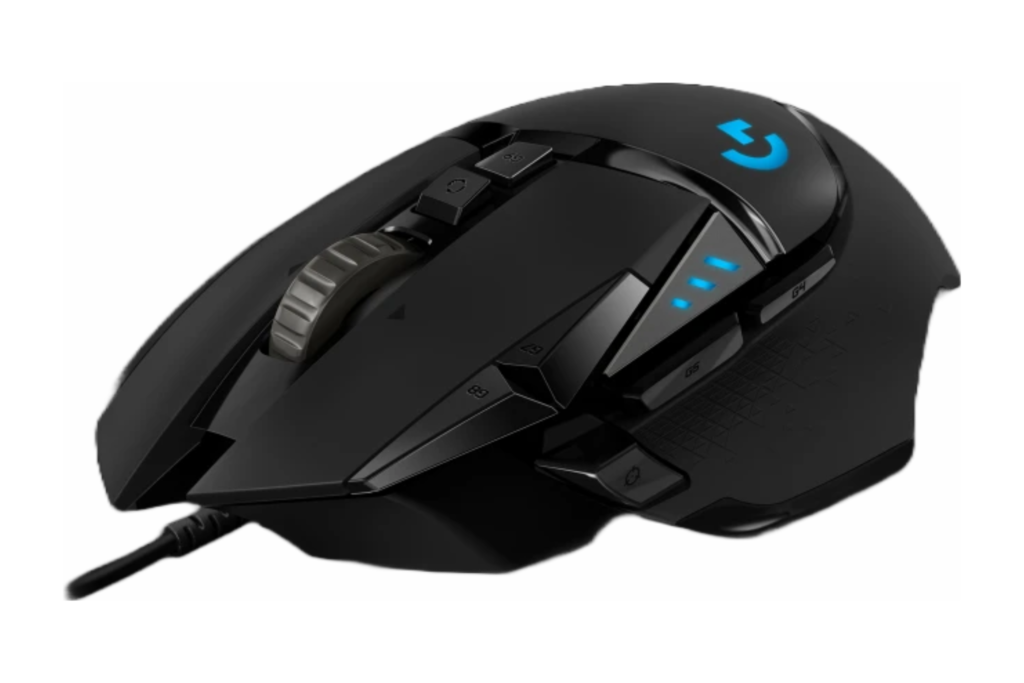
- 2 – Logitech M500:
This mouse device is the next most popular mouse device in the office. Based on the comments below, it seems simple yet mighty. For those who are interested in something that just gets the job done and do not need a lot of bells and whistles, check out the comments below.- “Simple, easy, responsive…not too complicated“
- “It has outlived 3 PCs and hasn’t failed me yet.“
- “It allows me to navigate different facets of my work environment more quickly.“
- “Reliable“
- “Cool racing stripes”***
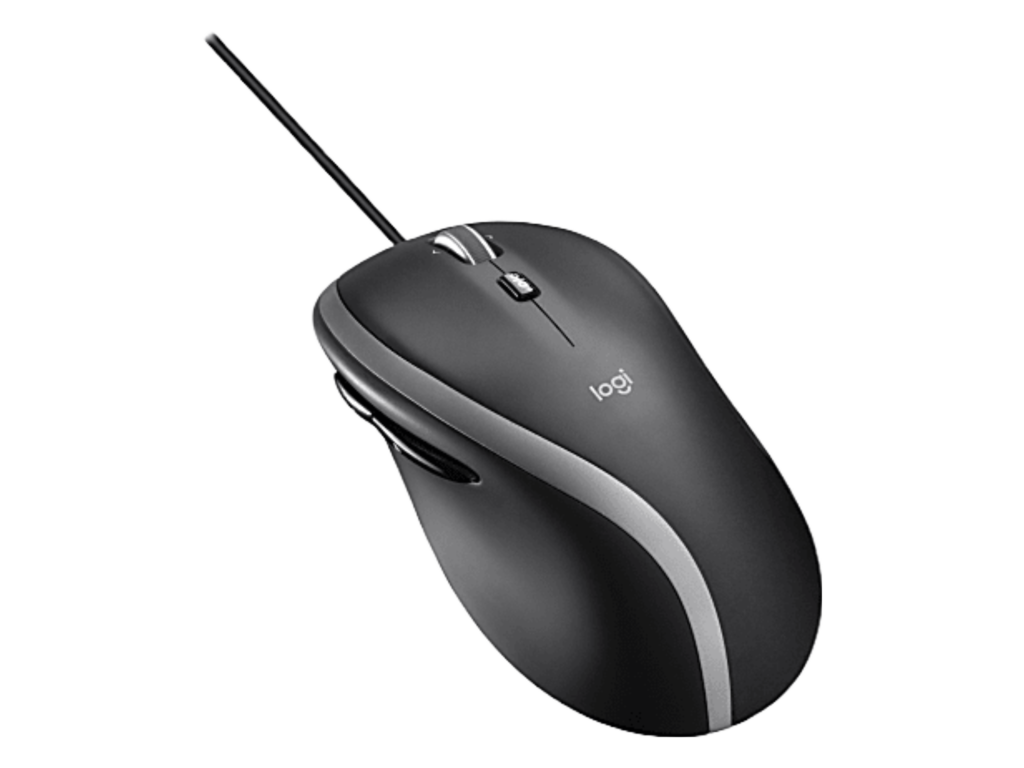
***It is still unclear at the time of this report whether or not “Cool racing stripes” refers to an after market product upgrade (sticker added to mouse device for strategic effect). No claims are to be assumed about “Cool racing stripes” allowing for navigating “more quickly.”
- 3 – Logitech MX Master:
This mouse seems to be a step up from a traditional design but with a little ergonomic flair.- “Ergonomic design is nice for long work days, and the app specific customization makes me more efficient.“
- “Ease of use and comfortable in hand.“

- 4 – DELUX Ergonomic:
This mouse is definitely for those who are more serious about ergonomic design. Those who experience strain from using traditional mouse devices may benefit from thinking outside the box a bit.- “The position of the wrist and hand while using a vertical mouse is more comfortable than twisting the wrist to match the traditional mouse. If you have to pull your hand out every once in a while because it’s strained, then comfort is the most important criteria here.“
- “Programmable buttons in the mouse decrease the time of travel from your mouse to keyboard and back to mouse when performing commands, therefore, increasing productivity. The keyboard can also have programmable buttons so this is not that big of a criteria.“
- “Vertical Position“
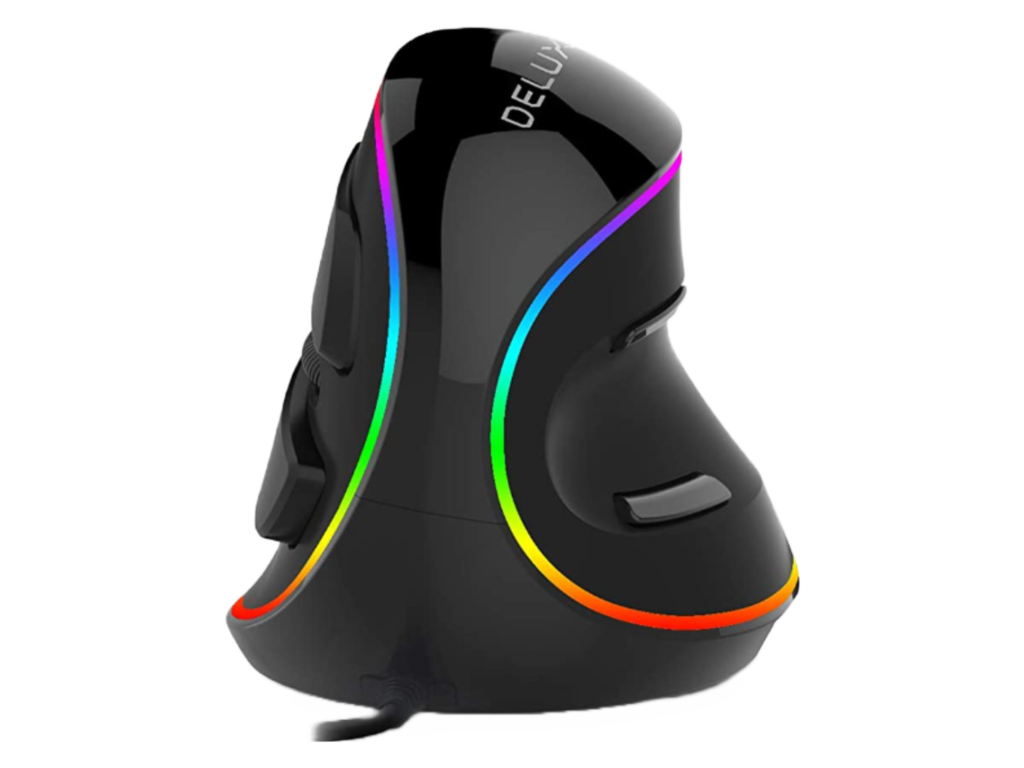
- 5 – 3Dconnexion SpaceMouse® Wireless:
Well, this is certainly a different design altogether. Rather than a re-purposed gaming mouse, this mouse seems to have been designed specifically for those using CAD applications.- “6 degrees of Freedom with 3D modeling software. Aids in easier navigation and makes the 3D model navigation in Navisworks/Revizto look more professional for Coordination meetings.“
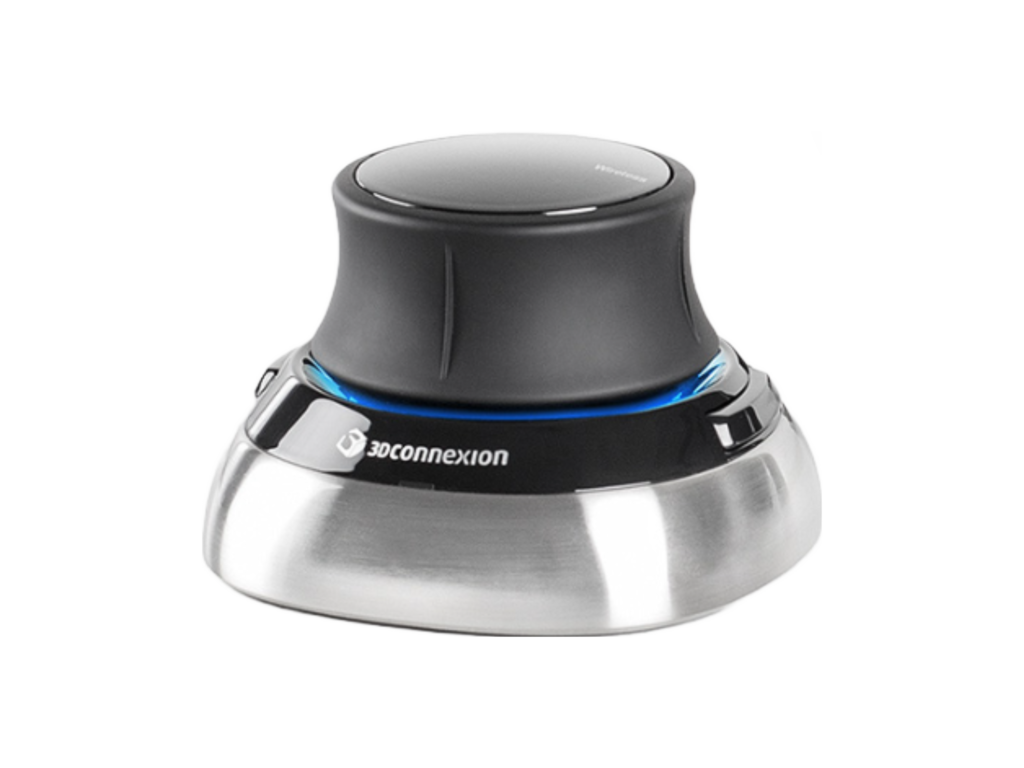
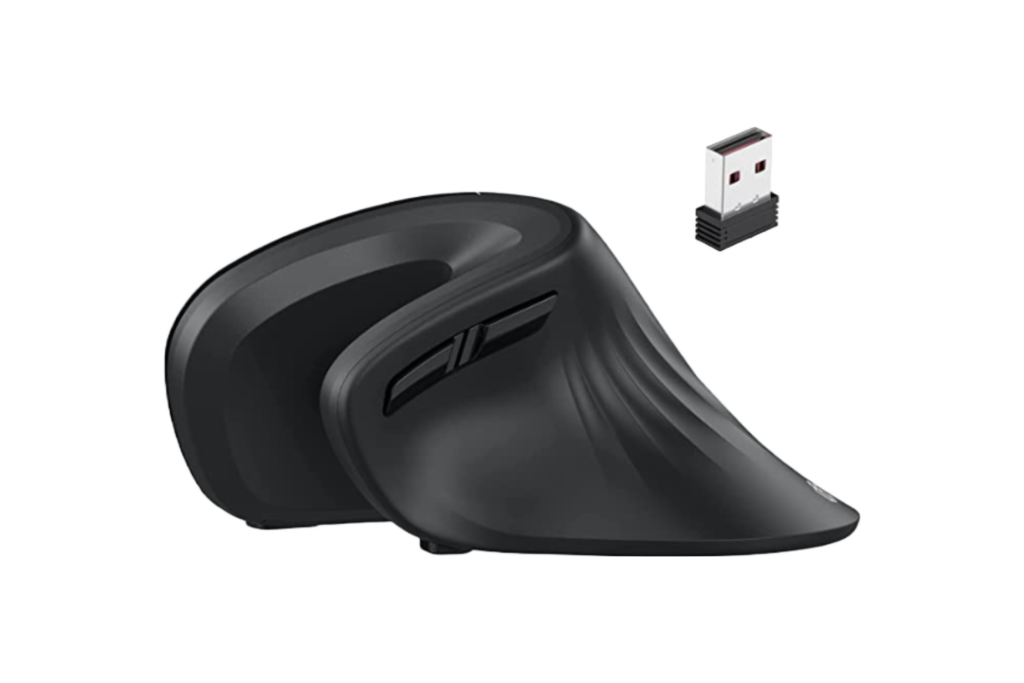
- 6 – iClever Ergonomic:
The picture really doesn’t do this one justice. This one also appears to have more of a vertical design. It gives off a feeling of working on while on the beach with its interesting seashell shape.- “Extended wrist rest provides user friendly experience, and avoids any hand pain.“
- “Hours of clicking sounds can be annoying. The reduced tip noise improves concentration, learning, and productivity.“
- 7 – Razer Naga Hex V2/Trinity:
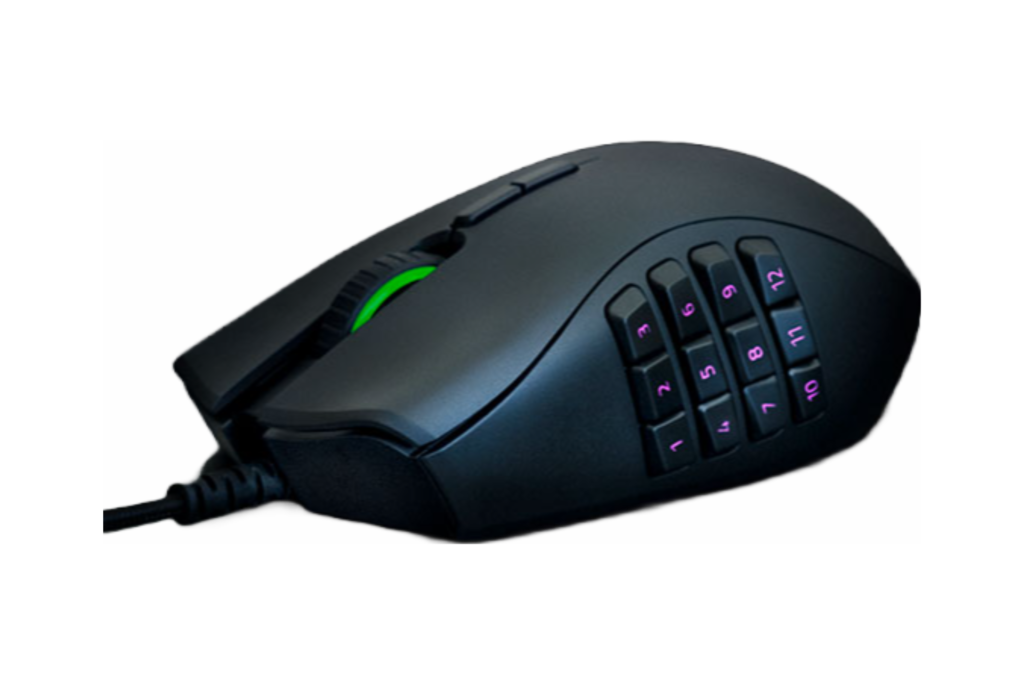
According to the website, “Razer™ is the world’s leading lifestyle brand for gamers.”(MOBA / MMO Gaming Mouse – Razer Naga Trinity). This could be another great option for those interested in mapping keyboard commands to a mouse.- “The Razer Naga Hex V2 / Trinity has a 7-button mechanical thumb wheel that makes it easy to learn and remember where all the buttons are located. The number of buttons are enough to map several common keyboard commands.“
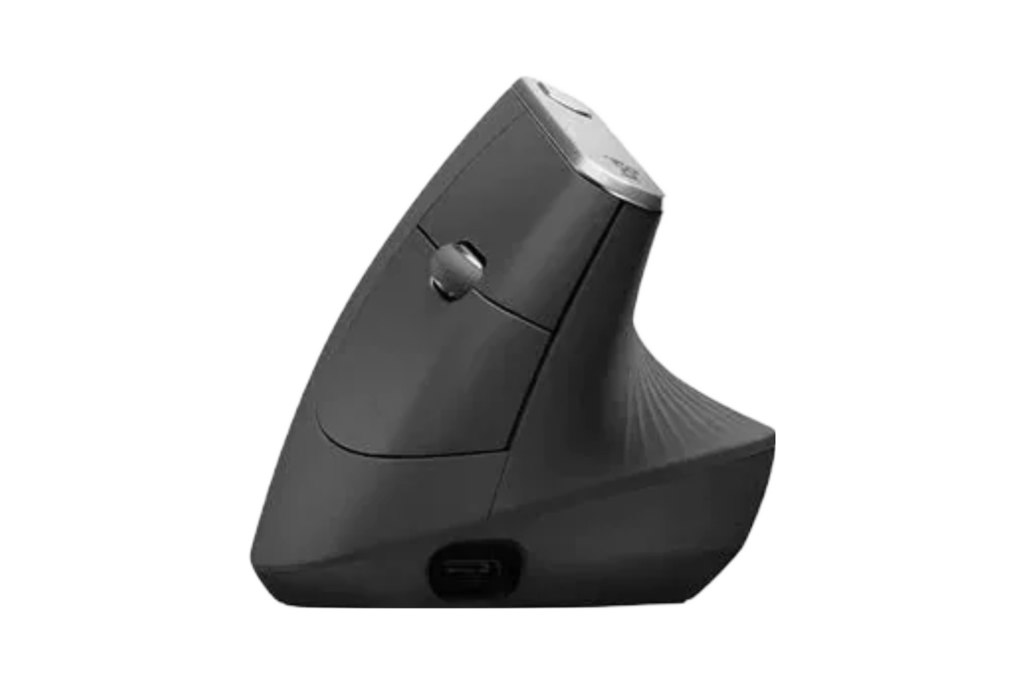
- 8 – MX Vertical Advanced Ergonomic Wireless & MX Keys Wireless Keyboard:
Here is another ergonomic design with a more vertical shape.- “Before using an ergonomic mouse, I started to have wrist pain early in the day. Now I go through an entire day without even thinking about it.”
- “The response and accuracy of the mouse are fantastic.“
- “The style and look of the keyboard and mouse help finish the face of my desk.“
- 9 – SteelSeries Rival 5mv:
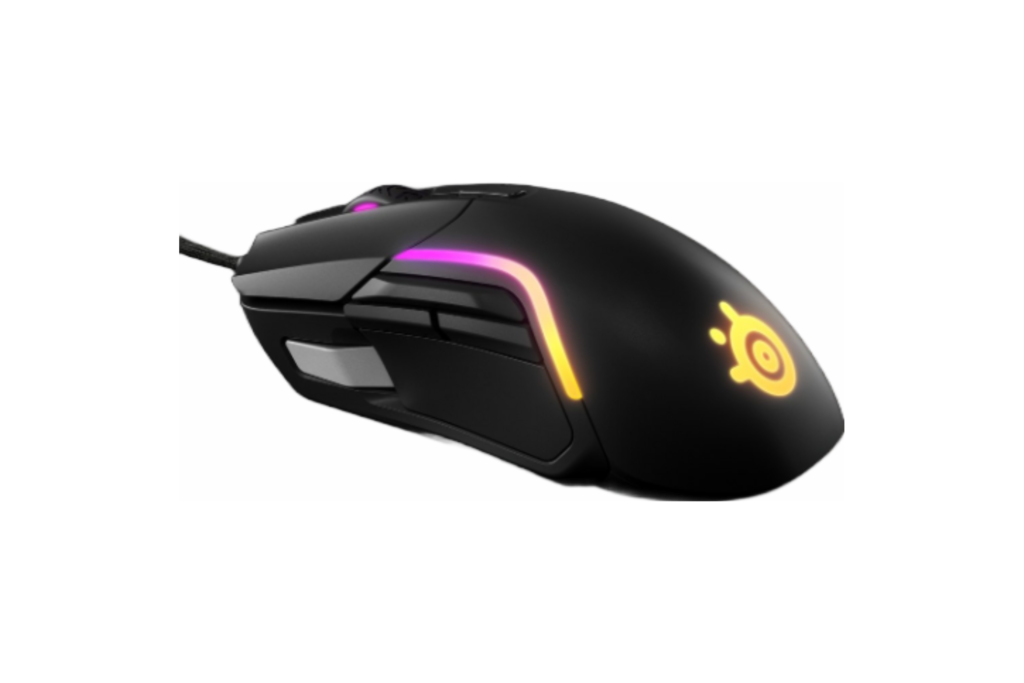
Those who are interested in lighting will enjoy the “Brilliant PrismSync lighting with 10 zones of 16.8 million beautifully crisp colors.”(Rival 5 gaming mouse). In addition to lighting, this mouse was designed for use with fast paced games.- “Lightweight and programmable buttons“
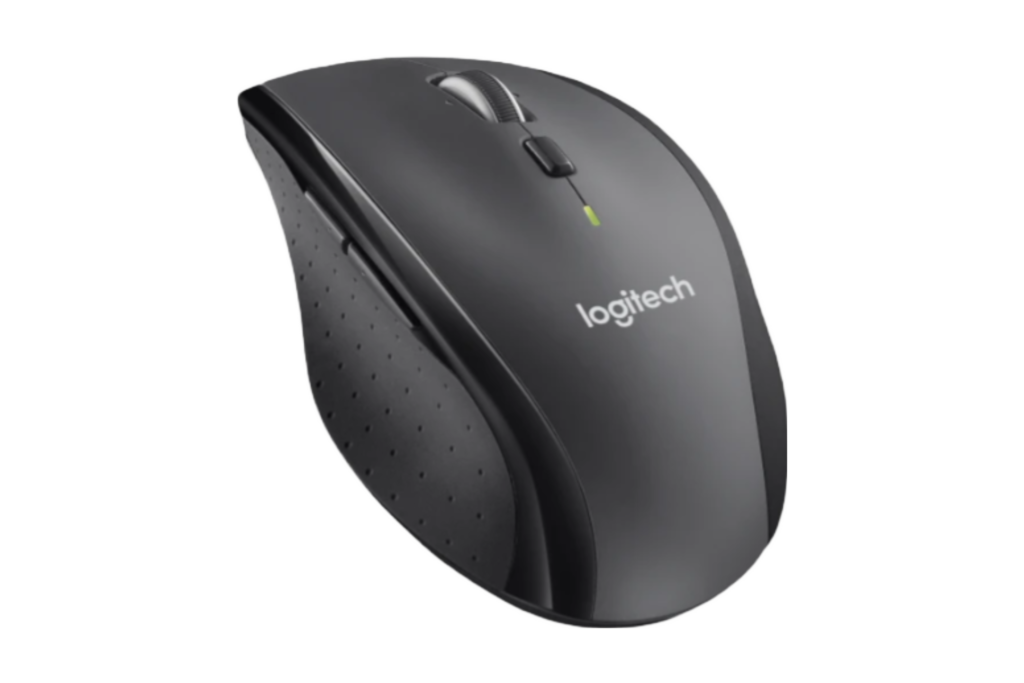
- 10 – M705 Marathon Logitech:
Last on our list is this no nonsense yet comfortably designed traditional style mouse. Simplicity can be a good thing.- “It’s wireless, simple, and comfy.“
- “Comfy design“
Conclusion
So there you have it: a top 10 list of mouse recommendations that could be your ticket to an elevated workflow. Didn’t see your mouse on this list? Take our survey to let us know more about the mouse device you recommend.
To conclude, all know that hardware isn’t the only answer for added productivity. The software you work in everyday offers opportunities to solve problems quickly, so projects can get out the door. To make that possible, it takes creative and innovative thinking. We approach BIM content creation and maintenance in the same way. The goal should not be only in achieving productivity in the moment. Quick wins now and long term wins later are possible with the right approach.
Next Steps
BIM Managers, do you have a library of Revit families that you haven’t had time to fix? Do you have a growing list of models that are teetering on your plate? We offer free BIM content Quality Polygon Score assessment summaries of existing BIM content. In addition, we offer BIM content creation and management services with a comprehensive multi-faceted approach.
Manufacturers, are you looking for a way to increase your chances of having your products specified on multiple projects? Let’s work together to discuss a plan for content creation and maintenance that ties to your real-life product life cycles and related processes. Your BIM content investment deserves to be more than a download, and we treat it as such. Manufacturers who are new to our collaborative and flexible process will gain access to our ever-evolving Manufacturer Welcome Package. Our Manufacturer Welcome Package provides guidance for every step of the way while working with us. We back our process with first-hand experience and understanding of your goals. We combine first-hand experience with the latest technology, time and time again. You and your customers’ successes are also our success. Experience the difference.
We are AEC professionals who build for AEC professionals, and we look forward to an opportunity to work with you. Please contact us at info@ENGworksGlobal.com to learn more.

Sources Cited:
3Dconnexion. (2022, March 29). SpaceMouse wireless – official 3DCONNEXION UK store. 3Dconnexion US. Retrieved August 31, 2022, from https://3dconnexion.com/us/product/spacemouse-wireless/
Kuklovskai︠a︡ Elizaveta. (n.d.). DELUX Ergonomic Mouse, Wired Large RGB Vertical Mouse with 6 Buttons, Removable Wrist Rest, 4000DPI and On-Board Software Reduce Hand Strain, for Carpal Tunnel(M618Plus RGB-Black). Amazon. Retrieved August 31, 2022, from https://www.amazon.com/dp/B07G4ZBW9H?pd_rd_i=B07G4ZBW9H&pf_rd_p=0e085ce4-a814-4f4b-b24c-1b9dbfa919e0&pf_rd_r=SNPK93QFZAH486VRMB48&pd_rd_wg=2280b&pd_rd_w=1Gp4R&pd_rd_r=b7562bde-606d-4758-bef5-839a700c9d1f
Kuklovskai︠a︡ Elizaveta. (n.d.). iClever Ergonomic Mouse – Wireless Vertical Mouse 6 Buttons with Adjustable DPI Comfortable 2.4G Optical Vertical Ergonomic Mouse for Mac, PC, Desktop, Laptop. Amazon. Retrieved August 31, 2022, from https://www.amazon.com/dp/B07YHS3W1Y?psc=1&ref=ppx_pop_dt_b_product_details
Lenovo. (n.d.). Logitech MX Master Wireless Mouse (meteorite) – retail CR version. Lenovo Official US Site. Retrieved August 31, 2022, from https://www.lenovo.com/us/en/p/accessories-and-software/keyboards-and-mice/mice/78012657?cid=us%3Asem%7Cse%7Cgoogle%7Cgs_smart%2Bshopping_seasonal_push%7Cgs_seasonal_push%7C%7C78012657%7C14380674959%7C126651798375%7Cpla-1651090154362%7Cshopping%7Cbrand&gclid=EAIaIQobChMI-IGxobPa-QIVE_rICh3cQw8xEAQYAyABEgIPhPD_BwE
Logitech. (n.d.). Logitech G502 hero high performance gaming mouse. Logitech. Retrieved August 31, 2022, from https://www.logitechg.com/en-us/products/gaming-mice/g502-hero-gaming-mouse.910-005469.html
Logitech. (n.d.). Logitech M500s advanced Corded Mouse with 7 custom buttons. Logitech. Retrieved August 31, 2022, from https://www.logitech.com/en-us/products/mice/m500s-corded-mouse.910-005783.html
Logitech. (n.d.). Logitech M705 Marathon Wireless Mouse with 3Y Battery Life. Retrieved August 31, 2022, from https://www.logitech.com/en-us/products/mice/m705-wireless-mouse.910-001935.html
Logitech. (n.d.). Logitech MX keys wireless keyboard with Backlit Keys. Logitech MX Keys Wireless Keyboard with Backlit Keys. Retrieved August 31, 2022, from https://www.logitech.com/en-us/products/keyboards/mx-keys-wireless-keyboard.html
Logitech. (n.d.). Logitech MX Vertical Mouse – usb, bluetooth. Logitech MX Vertical Mouse – USB, Bluetooth | Lenovo US. Retrieved August 31, 2022, from https://www.lenovo.com/us/en/p/accessories-and-software/keyboards-and-mice/mice/78010792?orgRef=https%253A%252F%252Fwww.google.com%252F&source=connexity&channel=cse&adcampaign=CSE_Connexitycon&cid=us%3Asem%7Cse%7Cgoogle%7CDSA_Catchall%7C%7C%7C%7C12992692526%7C124891993914%7Caud-939327936874%3Adsa-1303230222144%7Cdsa%7Cnon-brand&gclid=CjwKCAjw6raYBhB7EiwABge5Kr3S-Ds1-VFeebhc2Gp4yTbBi0p2dSRIqkE16toqWqZg1Q0rCk1z9xoCx0wQAvD_BwE
Razer. (n.d.). MOBA / MMO Gaming Mouse – Razer Naga Trinity. Razer Naga Trinity. Retrieved August 31, 2022, from https://www.razer.com/gaming-mice/razer-naga-trinity
SteelSeries. (n.d.). Rival 5 gaming mouse. SteelSeries Rival 5. Retrieved August 31, 2022, from https://steelseries.com/gaming-mice/rival-5
Autodesk Trademark Notice:
Autodesk, the Autodesk logo, Revit, AutoCAD, and Fabrication CADmep are registered trademarks or trademarks of Autodesk, Inc., and/or its subsidiaries and/or affiliates in the USA and/or other countries.
This publication is independent of Autodesk, Inc., and is not authorized by, endorsed by, sponsored by, affiliated with, or otherwise approved by Autodesk, Inc.
The ENGworks Global Team

Please also connect with us on our social media platforms below to stay up to date with our announcements.
Facebook Twitter Instagram Youtube Linkedin Back to the BlogRelated Posts

Visualizing BIM Content Quality and its Impacts
• May 26, 2022
Are You Losing Trust in Fabrication Content?
• May 10, 2022